
Free and open-source software (FOSS): What it means for security, privacy, and control


Free and open-source software (FOSS) is used in many of the tools you use every day. Browsers, operating systems, and encryption tools often rely on code that anyone can inspect, modify, and share.
This has real implications for security and privacy; it affects how vulnerabilities are found, how quickly they’re fixed, and how much control you have over the tools you use.
In this article, we’ll explore what FOSS means and how it compares to other software models. We also look at how it impacts your online security and privacy.
What FOSS means and how it works
FOSS is software with source code that anyone can access, modify, and share. "Free" refers to freedom, not price. With FOSS, you can run the software, study how it works, and distribute your own version.
FOSS is built through shared development. A maintainer or team publishes the code in a public repository, and other developers can review it, report issues, and suggest improvements.
Changes don’t go live automatically; developers submit updates, and others review and test them before anything’s accepted. If something doesn’t meet quality or security standards, it doesn’t get merged. Instead of relying on a single company, multiple contributors can examine the code and question decisions.
Open-source development improves visibility into how software works, but of course, it doesn’t guarantee that vulnerabilities will be found immediately. What it does provide is more opportunity for issues to be identified, reviewed, and improved over time.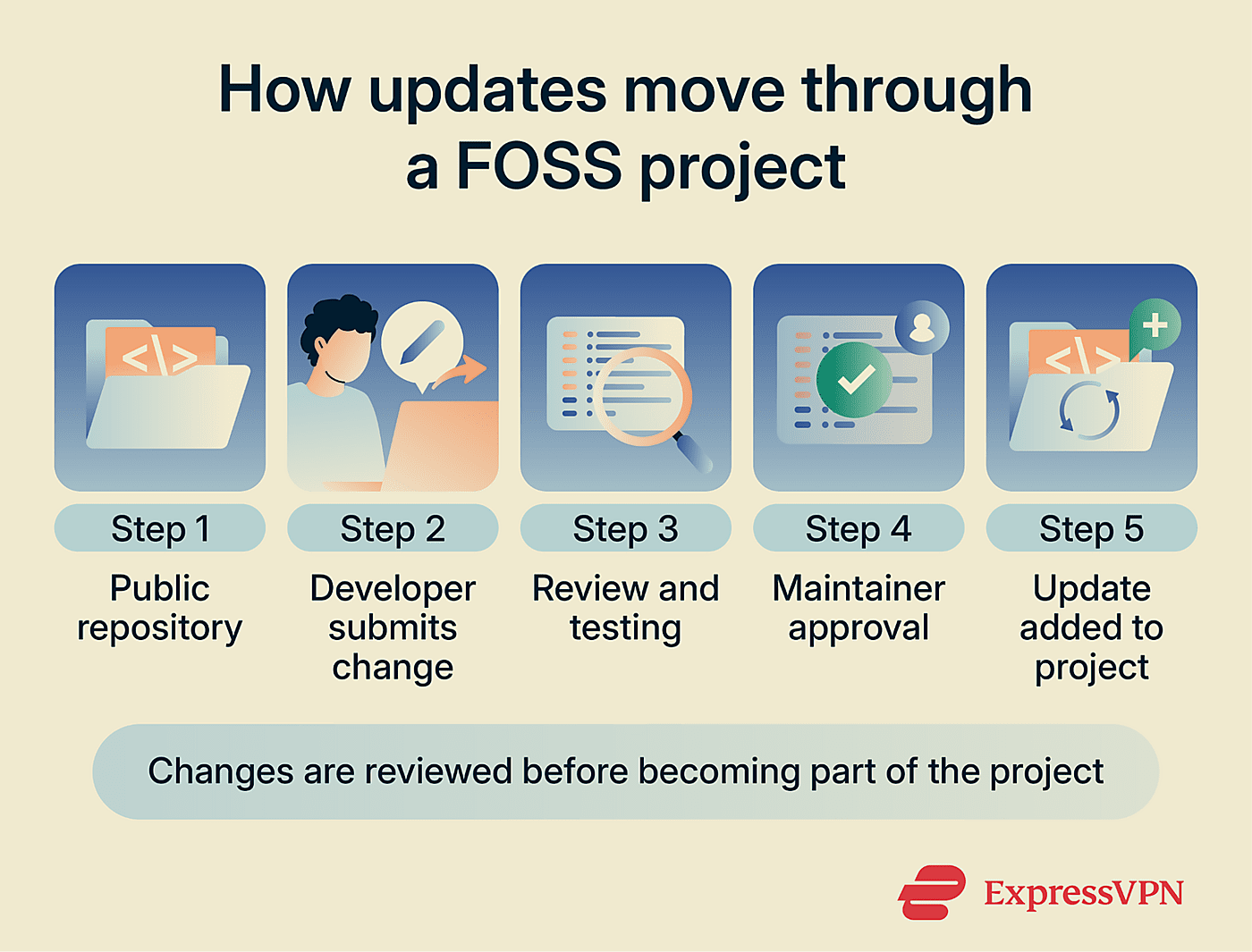
The free software movement and its goals
The free software movement started in the 1980s with a simple idea: users should have the freedom to run, study, modify, and share software. These principles were formalized by Richard Stallman and the Free Software Foundation.
That model still shapes many FOSS projects today. Code is worked on openly, with contributions from people who want to fix issues, improve features, or solve specific problems. Not all contributors are volunteers; some developers are paid to work on FOSS, while others contribute on their own time. How decisions are made depends on the project. Some are community-led, while others are primarily guided by a company.
This model is widely used in modern infrastructure. Operating systems, mobile platforms, and core internet technologies often rely on open-source components. FOSS isn’t just for small projects; it’s used at scale in real-world systems.
The FOSS model also shifts control. With proprietary software, updates, features, and long-term support depend on the vendor. With FOSS, users and developers can continue using or adapting the software even if the original team is no longer involved.
Read more: The hidden retention crisis in open source (and how FOSSASIA is solving it)
Why source code access matters
Access to source code means you can verify how software behaves, either by reviewing the code yourself or following others who do so. You don’t have to rely only on what a company says about security or privacy. What’s more, in regularly maintained FOSS projects, security fixes are often reviewed and released quickly once an issue is identified.
Most software users won’t review code themselves, but access allows independent experts to do it and share what they find.
FOSS vs. open-source, open core, and proprietary software
The terms FOSS, open-source, and open core are often used interchangeably, but there are certain subtle differences in meaning.
Free software vs. open-source software
The two terms are closely related, but they’re not the same. Free software focuses on users being able to freely run, modify, study, and share the software. Open-source software emphasizes collaborative development and code sharing rather than the ethical focus of the free software movement.
The terms overlap, and many projects fit both definitions. In practice, what matters most is the license and what users are allowed to do with the software.
Open core and source-available software
Not all publicly available code is FOSS. Some projects use "open core" models where a free version is public, while advanced features are only available in a proprietary paid version. Others use "source-available," where you can read the code but may not be able to change it.
Open core software
- A free version is available with public source code.
- The full (enterprise) version is proprietary and closed.
- You can inspect and use the free version, but advanced features are restricted.
This means users can inspect part of the product, while other features remain proprietary.
Source-available software
- You can read the code, but you may not be able to modify, redistribute, or reuse it.
- Restrictions depend on the license and may limit how the software can be used.
Because source-available software can restrict modification and redistribution, it doesn't meet the requirements of free software or the Open Source Definition. The difference comes down to control: with FOSS, you can change and share the code. With source-available, that freedom is restricted.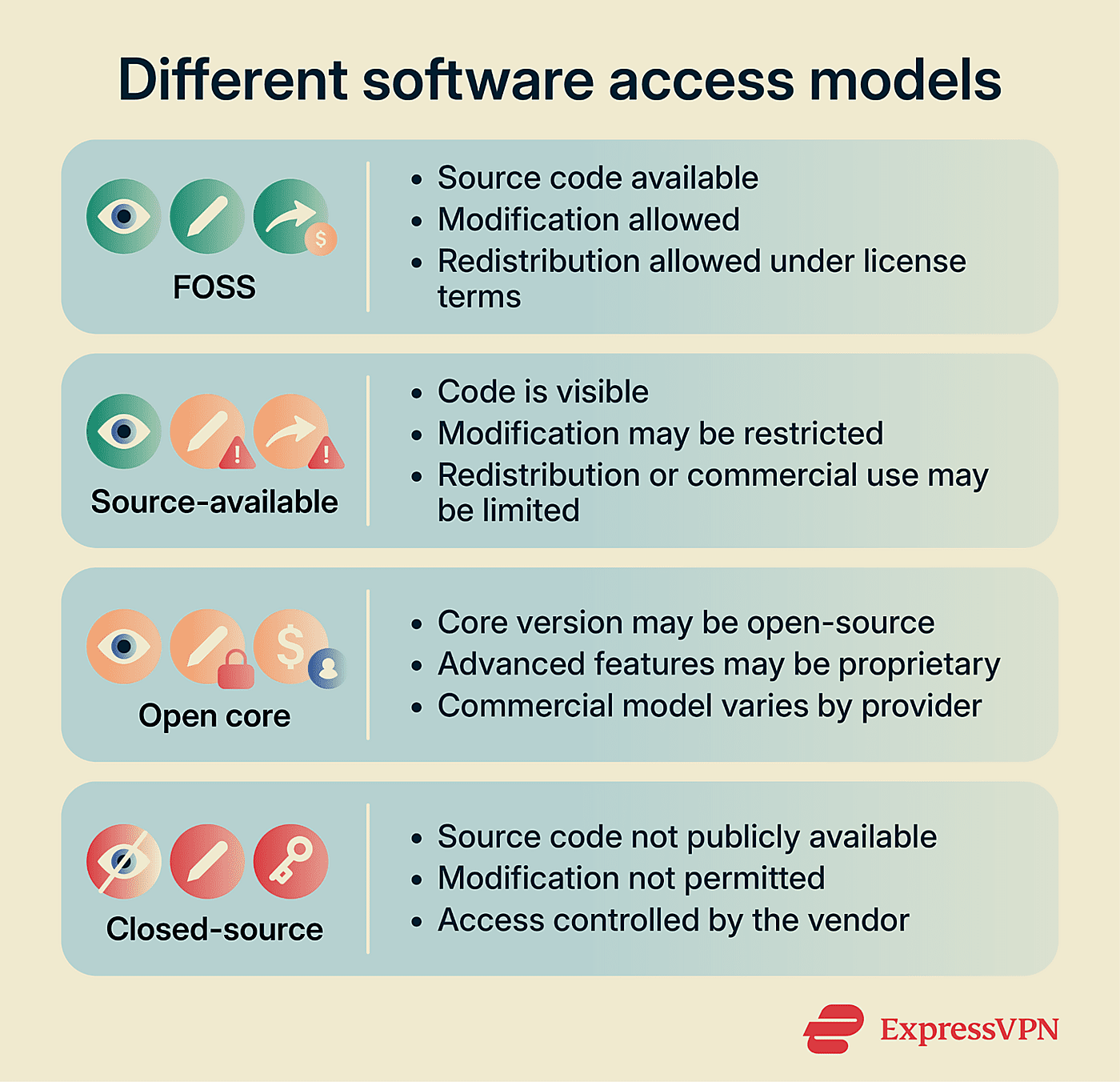
FOSS vs. closed-source software
Closed-source (proprietary) software keeps its source code private. Users receive compiled programs and run them without visibility into how they work. The vendor controls how the software evolves, including features, updates, and how security issues are handled.
This means users can't independently verify how the software handles data or how security issues are addressed. Instead, they rely on the vendor’s public statements, audits, or testing. Software changes depend on the vendor, and users have limited control over those decisions. Integrations are limited to what the vendor allows or supports.
With FOSS, you can extend and adapt the software yourself. Organizations often fork projects or maintain custom versions to fit their needs, without needing permission from a vendor.
| Aspect | FOSS | Closed-source (proprietary) |
| Source code | Public and accessible | Private and not accessible |
| Control | Users can modify and adapt the software | Controlled by the vendor |
| Transparency | Code can be reviewed and audited | Limited visibility into the code |
| Updates | Managed by maintainers or the community | Managed by the vendor |
| Customization | High: can be modified freely | Limited to vendor-supported options |
| Dependency | Can be maintained independently | More dependent on the vendor |
Benefits of open-source software
FOSS offers several well-recognized benefits, including the following.
Lower costs and fewer vendor lock-ins
FOSS is often free to use, which can reduce software costs for both individuals and businesses. Many FOSS licenses don't impose per-user or usage-based licensing restrictions. This allows organizations to use the same tools across multiple systems without additional licensing fees. For smaller teams or limited budgets, this can make a noticeable difference.
FOSS can also reduce dependency on a single vendor. The code can continue to be used even if the original provider is no longer involved.
Transparency, flexibility, and customization
FOSS can be adapted to fit specific needs. Instead of adjusting workflows to match a tool, teams can modify the tool itself to match how they work. This can be especially useful in environments with strict technical or regulatory requirements.
For example, a government agency may need to meet specific compliance standards, or a healthcare organization may need tighter control over how data is handled. With FOSS, these requirements can potentially be addressed by modifying the code directly. With proprietary software, those options depend on what the vendor provides.
Transparency also plays a role. Since the code is accessible, it can be reviewed before it’s used. This allows security teams and auditors to examine how the software works, which is important for systems that handle sensitive data.
Community support and flexible development
FOSS projects can benefit from community involvement because their source code is open for anyone to inspect, discuss, and improve. In active projects, contributors may report bugs, review changes, suggest features, write documentation, or submit fixes based on real-world use.
Security and privacy of FOSS
Open-source software isn’t automatically secure. But because the code is accessible, it can be independently inspected for security flaws.
Why transparency can improve security
Open development allows researchers and developers to examine how the software behaves in practice. Public access to the code can make problems easier to identify and discuss. It allows security concerns to be examined openly.
But visibility alone isn’t enough; the code still needs ongoing review. Well-known projects like OpenSSL or Linux are examined regularly, while smaller or less active projects may not receive the same level of scrutiny.
Privacy advantages of auditable software
Privacy depends on being able to check what software does with your data. With auditable software, independent reviewers can examine how information is collected, processed, or transmitted. This makes it easier to validate privacy claims instead of relying solely on a provider’s claims.
With closed-source software, that level of visibility isn’t available. Users can’t directly inspect how data is handled, so they depend on the provider’s disclosures and external testing.
When FOSS can be safer than proprietary software
FOSS can be a better option in areas where the code needs to be closely examined, such as encryption and security protocols. In these cases, the way the software is built and reviewed matters as much as the end result.
Libraries like OpenSSL or wolfSSL are widely used across many different environments and applications and continue to receive updates. They’re commonly used in security-focused software.
However, the level of maintenance matters. An open-source library that hasn’t been updated in years may contain known issues, while a proprietary tool that receives regular updates may address issues quickly.
Security risks and limitations of FOSS
While FOSS has established security benefits, vulnerabilities still exist, and making the code public doesn’t prevent them on its own.
Unmaintained projects and outdated dependencies
Many FOSS projects depend on other libraries to function. If those dependencies are no longer maintained or kept up to date, security issues can build up over time. A project can end up using components with known vulnerabilities without it being immediately obvious.
If a vulnerability is discovered and not fixed, it remains in place. Unlike proprietary software, where there’s usually a vendor responsible for updates, abandoned open-source projects may remain unpatched because no one holds the specific responsibility for fixing issues.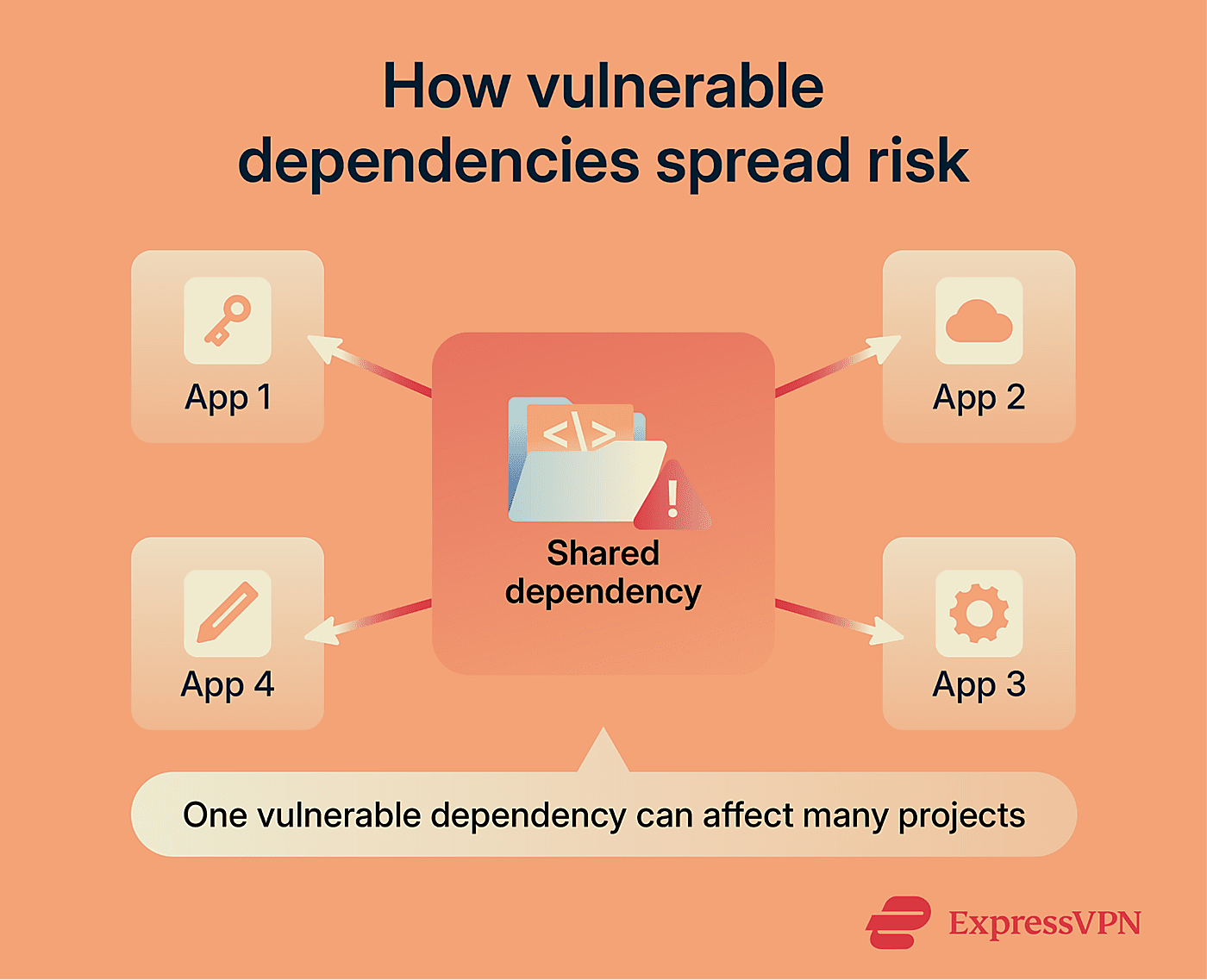
Vulnerabilities in widely used open-source components
When a widely used component has a flaw, the impact can spread way beyond a single project. Some libraries are used across thousands of applications. If one of those libraries has a vulnerability, it can affect many of the projects that depend on it. This makes these components a common target in supply chain attacks.
The Heartbleed vulnerability in OpenSSL is a well-known example. The flaw, introduced in 2012, remained undetected until 2014, when security researchers identified it during testing and analysis. Once discovered, a fix was released quickly. The challenge came afterward, since fixing the issue depended on users and organizations applying updates.
Two factors make these situations harder to manage:
- High-value targets: Widely used components can affect many systems when vulnerabilities are discovered.
- Delay between fix and adoption: Even when a patch is available, systems don’t update at the same pace. Until the fix is applied, the risk remains.
The importance of updates, audits, and trusted sources
Keeping software up to date is essential when using FOSS. Updates often include fixes for known issues, so delaying them can leave systems exposed. This means keeping track of new versions and applying them without long gaps.
For tools that handle sensitive data or critical functions, review can go further. Software security audits are often used before deploying software in production. These reviews examine how the code behaves and can uncover issues that aren’t obvious during regular use.
Where the software comes from also matters. Even if the code itself is legitimate, software distributions can sometimes be altered or compromised. Using official repositories and verifying package checksums can help reduce the risk of downloading malicious software packages.
To manage this, teams usually focus on a few key practices:
- Tracking updates: Staying aware of new releases so fixes aren’t missed.
- Applying patches: Installing security updates without unnecessary delays.
- Reviewing critical code and testing applications: Identifying vulnerabilities before deployment.
- Verifying sources: Downloading from official channels and checking file integrity.
Using FOSS safely in business or personal projects
When planning on using FOSS, either as an individual or a business, there are some key things to consider.
How to evaluate a FOSS project before using it
Before using a FOSS project, it helps to look at how it’s maintained and managed. These signals help you judge whether the project is safe to rely on. Consider:
- Maintenance and activity: Check the project’s repository. Recent commits and merged updates usually indicate active development. Long gaps without changes can suggest that maintenance has slowed down or stopped.
- Who maintains it: Some projects are run by a single developer, while others have multiple contributors or backing from companies. Broader involvement can make a project more stable over time, while single-maintainer projects can become harder to sustain.
- Community and responsiveness: Issue trackers and discussions show how problems are handled. Active communities tend to identify and address issues more quickly, especially when maintainers respond regularly.
- Security history: For more sensitive use cases, check whether the project has gone through security reviews. Audit reports or known vulnerability disclosures can show how issues are handled and whether they’re addressed openly.
Licensing and compliance basics
FOSS licenses don’t all work the same way. What you’re allowed to do with the software depends on the license it uses, so it’s important to understand the differences before using it.
Some licenses are very flexible. Permissive licenses like Massachusetts Institute of Technology (MIT), Apache 2.0, or Berkeley Software Distribution (BSD) generally allow you to modify the code, use it in commercial projects, and distribute it with few restrictions. In most cases, you just need to include the original license notice.
Others come with stricter conditions. Copyleft licenses such as General Public License (GPL) or Affero General Public License (AGPL) require that if you modify and distribute the software, you also share those changes under the same license. This can create limitations if you’re working on closed-source projects.
Some licenses sit in between, like Mozilla Public License (MPL) or Eclipse Public License (EPL). These allow commercial use but set specific conditions around how changes are shared or how the code is distributed.
In other words, license terms define how the software can be used, combined, and shared. Ignoring them can create legal issues, especially when multiple tools with different licenses are involved.
Best practices for secure FOSS adoption
Managing FOSS safely comes down to knowing what you’re using and having clear processes around it. Here are some tips:
- Know what’s in your stack: Keep track of the FOSS components you use, including versions and licenses. If a vulnerability is reported, you need to know quickly whether you’re affected. Tools that scan your codebase can help identify and monitor these components.
- Stay on top of updates: Follow project updates and releases so fixes don’t go unnoticed. This can be as simple as subscribing to release notes or using tools that alert you when new versions are available. You should implement a process to review and apply updates without long delays.
- Check dependencies for known issues: Dependencies can introduce risks on their own. Security tools can scan them against databases of known vulnerabilities and flag affected versions before deployment. This helps catch problems early, especially in larger projects.
- Use official distribution channels:Install software through trusted package managers or official sources whenever possible. These channels help verify integrity and make it easier to manage versions over time. Practices such as verifying downloads and checking software integrity are part of good cyber hygiene.
- Give back when you can: If you rely on a project, contributing, even in small ways, helps keep it active. Reporting bugs, improving documentation, or submitting fixes supports the tools you depend on.
- Set clear internal guidelines: For teams, it helps to define which tools are approved, how they’re evaluated, and how updates are handled. Clear guidelines reduce the risk of unsupported or risky components being introduced without review.
FAQ: Common questions about FOSS
Is FOSS always free to use?
Can FOSS be used for commercial projects?
How do I know if a FOSS project is trustworthy?
What happens if a FOSS project is abandoned?
Do FOSS licenses affect how I can share software?
Take the first step to protect yourself online. Try ExpressVPN risk-free.
Get ExpressVPN








Comments
Yes. For example, in regards to password managers, avoid closed sourced ones like LastPass, 1Password and instead use open sourced ones like KeePass and/or Bitwarden. Being open sourced is important for really putting all your “eggs in one basket” and being sure it’s code is publicly scrutinized.
Correct me if the following statement is false. The thing that I noticed that was not mentioned is that if Open Source allows you to edit and or embed the software to install other software in the background on your pc without your knowledge. Hackers (for example) or the "Average Joe" can redistribute these open source programs so that people unknowingly are victims of the lack of privacy of personal content (which they do) and antivirus programs do not even notice because it is source code?
I was very assured when I realized you guys were using OpenVPN for your clients, exactly for the reasons you listed in the article.
Boa noite, eu pesquisei sobre a Tor, vi que o risco de vazamento é 0%. Pelo que entendi é extremamente impossível que vazamentos de informações dos usuários aconteçam. A pergunta é a seguinte: A ExpressVPN é detentora desta mesma tecnologia? Quero adquirir um produto que me dê total segurança tanto contra hackers quanto por ventura se houver falha de um funcionário por exemplo. Eu não tenho informações importantes, mas vamos fazer de conta que eu tenho um diamante escondido na barriga de meu gatinho e um funcionário meu saiba. Se meu funcionário não for muito honesto pode ter certeza que meu gatinho vai ser sequestrado. É apenas uma analogia, mas que demonstra o quanto uma VPN pode oferecer melhores condições que outras. Aguardo mais informações.